


Verified & Correct AP-202 Practice Test Reliable Source Apr 29, 2026 Updated
Free Salesforce AP-202 Exam Files Downloaded Instantly
NEW QUESTION # 31
Which three file extensions are allowed in a Lightning Web Component folder?
- A. .jar
- B. .html
- C. .Js
- D. .gif
- E. .js-meta.xml
Answer: B,C,E
Explanation:
In a Lightning Web Component folder, the allowed file extensions include .js-meta.xml for the component's metadata, .html for the component's markup, and .js for the component's JavaScript class. These files are essential for defining the structure, behavior, and metadata of a LWC. Salesforce LWC documentation provides detailed information on the structure of a LWC bundle and the purpose of each file type within it.
NEW QUESTION # 32
A developer suspects that a defect exists in 30 lines of Apex code. How can the developer add debug statements, run the block of apex code in isolation and observe the immediate results?
- A. Use the Execute Anonymous window
- B. Click the Check Out button in the storefront
- C. Use the Execute Immediate window
- D. Activate Chrome dev tools and click the Check Out button in the Storefront
Answer: A
Explanation:
To debug a specific block of Apex code, the Execute Anonymous window in the Salesforce Developer Console or an Integrated Development Environment (IDE) like Visual Studio Code with the Salesforce Extension Pack can be used. This tool allows developers to run Apex code snippets in isolation and observe the results immediately, which is valuable for identifying and resolving defects within specific code blocks.
NEW QUESTION # 33
Which three components should a developer use on the product page to replace the out-of-the-box Product Detail Card component?
- A. Product Field Long component
- B. Product Detail Purchase Options component
- C. Product Detail Image Gallery component
- D. Product Fields Short component
- E. Product Detail Breadcrumbs component
Answer: D
NEW QUESTION # 34
A developer exports data from an org on a standard entity which has a custom attribute. When they launch Data Loader, select the entity, click the Select All Fields button and click Finish, the custom field they added called MyCustomField_c has no values and no column header in the CSV file. What is the root cause?
- A. The user does not have access to the field
- B. The user has rights to the field but there are no values in it
- C. A mapping file was not used when the data was loaded in
- D. The user needs to install a specific Zulu JDK that is recommended by Salesforce.
Answer: A
Explanation:
The root cause of why the custom field MyCustomField__c has no values and no column header in the CSV file is that the user does not have access to the field. A user's access to a field is determined by their profile and permission sets, which define their field-level security settings. Field-level security settings control whether a user can see, edit, or delete the value for a particular field on an object. If a user does not have access to a field, they will not be able to view or modify its value in any interface, including Data Loader. Data Loader is a tool that allows users to import or export data between Salesforce and CSV files. When using Data Loader to export data from an org, Data Loader will only include fields that are accessible to the user based on their field-level security settings. If a user does not have access to a field, Data Loader will not include that field in the CSV file, neither as a column header nor as a value. The user needs to install a specific Zulu JDK that is recommended by Salesforce is not the root cause of why MyCustomField__c has no values and no column header in the CSV file, as it is not related to field access or Data Loader functionality. A mapping file was not used when the data was loaded in is not the root cause either, as it is not related to field access or Data Loader functionality. A mapping file is an optional file that maps fields between Salesforce objects and CSV files when using Data Loader to import or export data. The user has rights to the field but there are no values in it is not the root cause either, as it contradicts the fact that MyCustomField__c has no column header in the CSV file. If the user had rights to the field but there were no values in it, Data Loader would still include MyCustomField__c as a column header in the CSV file, but leave its values blank. Salesforce [Data Loader Guide: Export Data from Salesforce], [Data Loader Guide: Field Mapping], [Salesforce Help: Set Field-Level Security]
NEW QUESTION # 35
Which code statement should a developer use to import the ID of the current Lightning Experience
- A. import id from '@salesforce/site/ld'
- B. import id from '@salesforce/network/ld'
- C. import id from '@salesforce/experience/ld'
- D. import id from '@salesforce/community/ld'
Answer: D
Explanation:
To import the ID of the current Lightning Experience community, a developer should use the following code statement:
import id from '@salesforce/community/Id';
The @salesforce/community module allows the developer to access information about the current community, such as its ID, name, URL, and base path. The other modules do not exist or are not related to the community ID. The @salesforce/network module is used to access information about the current network, such as its ID and name. The @salesforce/experience module is used to access information about the current user experience, such as whether it is standard or custom. The @salesforce/site module is used to access information about the current site, such as its name and prefix. Salesforce [Lightning Web Components Developer Guide: Import Community Information], [Lightning Web Components Developer Guide: Import Salesforce Modules]
NEW QUESTION # 36
Which two methods should a developer implement in a Lightning web component to successfully handle the subscription lifecycle of a Message Channel?
- A. startListener()
- B. unsubscribe()
- C. stopListener()
- D. Subscribe()
Answer: B,D
Explanation:
To handle the subscription lifecycle of a message channel in a Lightning web component, the developer should implement thesubscribe()andunsubscribe()methods from thelightning/messageServicemodule. Thesubscribe()method returns a subscription object that represents the connection to the message channel. The developer can use this object to unsubscribe from the message channel later. Theunsubscribe()method takes a subscription object as a parameter and removes the listener from the message channel. The developer should call theunsubscribe()method when the component is disconnected from the DOM, such as in thedisconnectedCallback()lifecycle hook, to avoid memory leaks and performance issues.
The other options are not correct because:
B) stopListener() is not a valid method for handling the subscription lifecycle of a message channel. There is no such method in thelightning/messageServicemodule or the Lightning web component framework.
C) startListener() is not a valid method for handling the subscription lifecycle of a message channel. There is no such method in thelightning/messageServicemodule or the Lightning web component framework.
Subscribe and Unsubscribe from a Message Channel
Lifecycle Hooks
Use message channel in both direction
NEW QUESTION # 37
Which event is triggered within Salesforce B2B Commerce whenever a cart's statechanges?
- A. cartState
- B. pageMessage
- C. cart
- D. cartChange
Answer: D
Explanation:
The event that is triggered within Salesforce B2B Commerce whenever a cart's state changes is cartChange. This event is triggered by the updateCart method of the CCRZ.Cart class, which is responsible for updating the cart data and performing any actions that depend on the cart state, such as applying discounts, taxes, or shipping charges. The event can be used to notify all the components that are listening to it that the cart has changed and they should refresh their data accordingly. Salesforce B2B Commerce and D2C Commerce Developer Guide,Events,Cart Class
NEW QUESTION # 38
What are the templating, Javascript, and CSS frameworks what the cloudcraze managed package leverages?
- A. Angularjs, Backbonejs, and handlebarsjs
- B. Bootstrap, Angularjs, and Backbonejs
- C. Bootstrap, Backbonejs, and handlebarsjs
- D. Angularjs, react.js, and handlebarsjs
Answer: C
Explanation:
The templating, JavaScript, and CSS frameworks that the cloudcraze managed package leverages are Bootstrap, Backbone.js, and Handlebars.js. Bootstrap is a CSS framework that provides responsive design and layout components. Backbone.js is a JavaScript framework that provides models, views, collections, and events for building single-page applications. Handlebars.js is a templating engine that allows generating HTML from JSON data. Salesforce B2B Commerce and D2C Commerce Developer Guide,Front-End Development
NEW QUESTION # 39
What does the developer need to implement to override Shipping in Checkout? 38m 04s
- A. sfdc_checkout.CartShippingCharges
- B. sfdc_commerce ShippingCharges
- C. sfdc_checkout.ShippingCharges
- D. sfdc_commerce.CartShippingCharges
Answer: A
Explanation:
To override shipping charges during the checkout process, the developer needs to implement a specific interface, likely sfdc_checkout.CartShippingCharges. This interface would allow for custom logic to calculate and apply shipping charges based on the cart's contents and other criteria, ensuring flexibility and accuracy in handling shipping costs within the checkout flow.
NEW QUESTION # 40
Which three actions must a developer take, in a B2B Commerce store, to accept credit card payments using a client's chosen payment provider?
- A. Create an Apex class that implements the commercepayments.PaymentGatewayAdapter.
- B. Create an Apex class that implements the sfdc_checkout.PaymentGatewayAdapter
- C. Create a PaymentProviderGateway record for the custom payment provider class.
- D. Create a RegisteredExternalService record for the custom payment provider class.
- E. Create a named credential for authentication with the payment provider.
Answer: B,C,E
Explanation:
Three actions that a developer must take, in a B2B Commerce store, to accept credit card payments using a client's chosen payment provider are: create a named credential for authentication with the payment provider, create an Apex class that implements the sfdc_checkout.PaymentGatewayAdapter interface, and create a PaymentProviderGateway record for the custom payment provider class. Creating a named credential for authentication with the payment provider allows the developer to securely store and manage authentication information, such as username, password, token, or certificate, for connecting to the payment provider's API or service. Creating an Apex class that implements the sfdc_checkout.PaymentGatewayAdapter interface allows the developer to define custom logic for processing credit card payments using the payment provider's API or service. The interface provides methods for validating credit card information, authorizing payments, capturing payments, voiding payments, and refunding payments. Creating a PaymentProviderGateway record for the custom payment provider class allows the developer to register the custom payment provider class as a payment gateway in the store and associate it with a payment method. Creating a RegisteredExternalService record for the custom payment provider class is not a required action, as this is only used for registering external services that are not related to payment processing, such as tax or shipping services. Creating an Apex class that implements the commercepayments.PaymentGatewayAdapter interface is not a required action either, as this is only used for D2C Commerce stores, not B2B Commerce stores. Salesforce B2B Commerce Developer Guide: Payment Integration, B2B Commerce Developer Guide: Payment Gateway Adapter Interface, B2B Commerce Developer Guide: Payment Provider Gateway Object
NEW QUESTION # 41
A dev at Northern Trail Outfitters (NTO) exported Order Summary records via Data Loader, but noticed that some orders were missing. What is the most likely cause?
- A. Original Order information was missing
- B. Currency mapping was not done correctly
- C. Status was not in Created
- D. Billing Contact was missing
- E. Order Life Cycle Type was Managed
Answer: C
Explanation:
When exporting Order Summary records via Data Loader, if some orders are missing, a common cause could be that those orders did not have a status that was included in the export criteria, such as 'Created'. Salesforce data exports can be filtered based on specific criteria, and if the status of some orders doesn't match the criteria, those orders will not be included in the export. The other options listed are less likely to be direct causes for missing orders in an export operation. For more information on using Data Loader and understanding export criteria, refer to the Salesforce Data Loader Guide: Salesforce Data Loader Guide.
NEW QUESTION # 42
In checkout, what event should the developer's code listen for in order to help troubleshoot and respond to actions?
- A. CommerceActionEvents
- B. CommerceBubbleEvents
- C. CommerceDiagnosticEvents
- D. CommerceErrorEvents
Answer: C
Explanation:
To help troubleshoot and respond to actions in checkout, the developer's code should listen for CommerceDiagnosticEvents. CommerceDiagnosticEvents is an event that is fired by Salesforce B2B Commerce when an error occurs in the storefront. CommerceDiagnosticEvents contains information about the error, such as error code, error message, error type, and error details. CommerceDiagnosticEvents can be subscribed by other components or services that want to handle or display the error information in different ways. The developer's code can listen for CommerceDiagnosticEvents using anaura:handlertag in Aura Components or an @wire decorator in Lightning web components. The developer's code can also use the event information to perform custom logic or actions based on the error, such as logging, reporting, or notifying. CommerceBubbleEvents is not an event that the developer's code should listen for in checkout, as it is not related to troubleshooting or responding to actions. CommerceBubbleEvents is an event that is fired by Salesforce B2B Commerce when a user interacts with a bubble component in the storefront. A bubble component is a user interface element that displays information or options in a pop-up window when clicked or hovered over. CommerceBubbleEvents contains information about the user interaction, such as bubble name, bubble type, and bubble value. CommerceErrorEvents is not an event that the developer's code should listen for in checkout either, as it is not related to troubleshooting or responding to actions. CommerceErrorEvents is an event that is fired by Salesforce B2B Commerce when a validation error occurs in the storefront. CommerceErrorEvents contains information about the validation error, such as field name, field label, and error message. CommerceActionEvents is not an event that the developer's code should listen for in checkout either, as it is not related to troubleshooting or responding to actions. CommerceActionEvents is an event that is fired by Salesforce B2B Commerce when a user performs an action in the storefront. CommerceActionEvents contains information about the user action, such as action name, action type, and action parameters. Salesforce B2B Commerce Developer Guide: Handle Errors,B2B Commerce Developer Guide: Handle User Interactions with Bubble Components,B2B Commerce Developer Guide: Handle Validation Errors,B2B Commerce Developer Guide: Handle User Actions
NEW QUESTION # 43
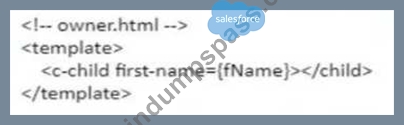
Northern Tail Outfitters (NTO) is converting an existing aura component into a Lightning Web Component. The aura component has the following source code: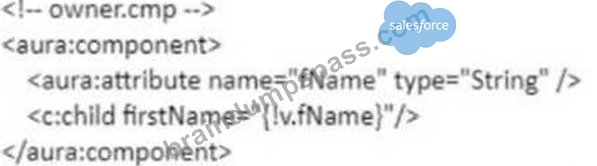
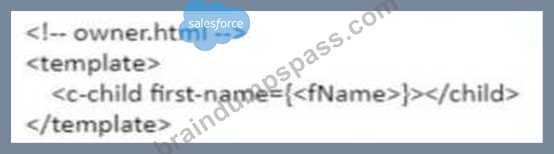
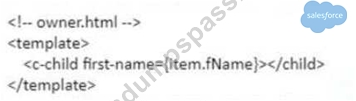
What is the equivalent of this code in a Lightning Web Component?
- A.
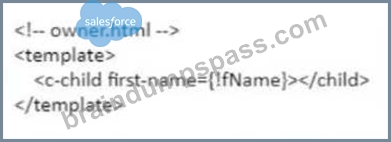
- B.
- C.
- D.
Answer: D
Explanation:
The equivalent of this code in a Lightning web component is option B. Option B uses the @api decorator to expose firstName as a public property of the Lightning web component and communicate it with other components or services. The @api decorator is a decorator that marks a property or method as public, which means that it can be accessed by other components or services that use or consume this component. The @api decorator also makes the property reactive, which means that it can track changes and update the component accordingly. In option B, firstName is exposed as a public property using the @api decorator and passed to the child element using an attribute. Option A is incorrect because it uses an invalid syntax for exposing firstName as a public property. The @api decorator should be used before the property declaration, not after it. Option C is incorrect because it uses an invalid syntax for exposing firstName as a public property. The @api decorator should be used with parentheses, not without them. Option D is incorrect because it uses an invalid syntax for exposing firstName as a public property. The @api decorator should be used with camel case, not with hyphens. Salesforce Lightning Web Components Developer Guide: Communicate with Properties, Lightning Web Components Developer Guide: Decorators
NEW QUESTION # 44
A developer is working in Visual Studio Code on a previously deployed project which is rather large and deployments are time consuming. The developer wants to deploy some small CSS changes without waiting for the entire project deployment. What are two ways this can be accomplished?
- A. Deploy the entire project. Only the change will be copied
- B. Right-click the CSS file and choose Deploy Source to Org
- C. Click the Tools menu and select Deploy styles
- D. Right-click the CSS file that was edited and select Deploy Single File
- E. Right-click the folder for the component and choose Deploy Source to Org
Answer: D,E
Explanation:
Two ways that a developer can deploy some small CSS changes without waiting for the entire project deployment are right-clicking the folder for the component and choosing Deploy Source to Org and right-clicking the CSS file that was edited and selecting Deploy Single File. Deploying source to org is a way of deploying metadata from a local project to an org using Salesforce CLI commands. The developer can use Visual Studio Code to execute these commands by right-clicking on files or folders in the project and choosing from various deployment options. Right-clicking the folder for the component and choosing Deploy Source to Org allows the developer to deploy only the files that belong to that component, such as HTML, JavaScript, CSS, and XML files. Right-clicking the CSS file that was edited and selecting Deploy Single File allows the developer to deploy only that CSS file and not any other files in the project. These options can save time and bandwidth for deploying small changes without affecting other components or files in the project. Modifying the StoreIntegratedService to map to an Apex class ID using Workbench is not a way of deploying CSS changes, as it is only used for registering internal services that are provided by Salesforce B2B Commerce out-of-the-box. Entering the integration class name and version in store administration is not a way of deploying CSS changes either, as it is only used for selecting an existing integration class that has already been registered as an external service. Salesforce Salesforce CLI Command force:source:deploy, Salesforce Developer Tools for Visual Studio Code, B2B Commerce Developer Guide: Integration Framework, B2B Commerce Developer Guide: RegisteredExternalService Object
NEW QUESTION # 45
An administrator has just provided a developer with a completely new org and a username. Assuming the username is [email protected], what is the correct set of steps to authorize the org for Command Line Interface (CLI) access so the developer can deploy Lightning web components?
- A. Run the command 'sfdx force:auth:web:login -a "https://login.salesforce.com'"' and then supply the credentials in the browser when it opens.
- B. Run the command 'sfdx force:auth:web:login -r "https://login.salesforce.com" -username^'mefaJmy-new-org.org"'
- C. Run the command: 'sfdx force:auth:web:login -r "https://login.salesforce.com" and then supply the credentials in the ^ browser when it opens ^
- D. Run the command: 'sfdx force:login -r "https://login.salesforce.com'' and supply the credentials in the browser when it opens.
Answer: C
Explanation:
To authorize the org for Command Line Interface (CLI) access so the developer can deploy Lightning web components, the developer should run the command: 'sfdx force:auth:web:login -r "https://login.salesforce.com" and then supply the credentials in the browser when it opens. The sfdx force:auth:web:login command is a Salesforce CLI command that authorizes an org using the web server flow. The web server flow is an OAuth 2.0 authentication flow that opens a browser window and prompts the user to log in to Salesforce and allow access to the CLI. The -r flag specifies the login URL of the org, which is https://login.salesforce.com for production or developer orgs. Running this command will open a browser window and ask the developer to enter their username and password for the org. After successfully logging in, the developer will be able to use the CLI to perform various tasks with the org, such as deploying or retrieving metadata, running tests, or executing commands. Running the command: 'sfdx force:login -r "https://login.salesforce.com" is not a valid way to authorize the org for CLI access, as there is no such command as sfdx force:login. Running the command 'sfdx force:auth:web:login -a "https://login.salesforce.com"' is not a valid way either, as the -a flag specifies an alias for the org, not a login URL. Running the command 'sfdx force:auth:web:login -r "https://login.salesforce.com" -username'[email protected]"' is not a valid way either, as there is no such flag as -username. Salesforce Salesforce CLI Command force:auth:web:login,Salesforce Developer Tools for Visual Studio Code
NEW QUESTION # 46
Which two methods from the platformResourceLoader module are relevant for including third party JavaScript and CSS in a Lightning web component?
- A. loadStyle
- B. loadCss
- C. loadClientScript
- D. loadScript
Answer: A,D
Explanation:
Two methods from the platformResourceLoader module that are relevant for including third party JavaScript and CSS in a Lightning web component are loadScript and loadStyle. The platformResourceLoader module is a module that provides methods for loading JavaScript or CSS files from static resources or external URLs into a Lightning web component. The loadScript method is used to load a JavaScript file and execute it in the component. The loadStyle method is used to load a CSS file and apply it to the component. The loadClientScript method does not exist or is not relevant for including third party JavaScript in a Lightning web component. The loadCss method does not exist or is not relevant for including third party CSS in a Lightning web component. Salesforce Lightning Web Components Developer Guide: Load Scripts and Style Sheets, [Lightning Web Components Developer Guide: platformResourceLoader Module]
NEW QUESTION # 47
What are two guidelines for logging that are used within the core Salesforce B2B Commerce product? (2 answers)
- A. The close method of ccrz.ccLog must be called at the end of the remote action.
- B. It is okay to log any data on the server that is already logged on the client side.
- C. No calls to ccrz.ccLog can be made before cc_CallContext.initRemoteContext is executed.
- D. Items or data within computational intensive loops shouldbe logged.
Answer: A,C
Explanation:
Two guidelines for logging that are used within the core Salesforce B2B Commerce product are:
The close method of ccrz.ccLog must be called at the end of the remote action. This method will flush the log messages to the browser console or to a custom object, depending on the logging mode. If this method is not called, the log messages may not be displayed or saved properly.
No calls to ccrz.ccLog can be made before cc_CallContext.initRemoteContext is executed. This method will initialize the call context object, which contains information such as the current user, cart, storefront, and configuration settings. These information are required for logging, so calling ccrz.ccLog before initializing the call context will result in an error. Salesforce B2B Commerce and D2C Commerce Developer Guide,Logging
NEW QUESTION # 48
What does a developer need to do to modify the out-of-the-box checkout flow template?
- A. Modify directly and save to activate
- B. Create each flow from scratch
- C. Clone, modify, activate and refer in Experience Builder
- D. Clone, modify and rename to Checkout Flow
Answer: C
Explanation:
To modify the out-of-the-box checkout flow template in Salesforce B2B Commerce, a developer should clone the existing template, make the necessary modifications, activate the modified template, and then reference it in the Experience Builder. This approach ensures that the original template remains intact and provides a fallback option. Salesforce documentation on customizing the checkout flow in B2B Commerce emphasizes the importance of using the Experience Builder for such customizations, providing a visual interface to manage and reference different checkout flow templates.
NEW QUESTION # 49
A product is assigned to the entitlement policy but is missing from the Price Book related to the Buyer Group. The entitlement policy has View products and View prices in catalog checked.
How will the product behave on the B2B Portal?
- A. The product will not appear on the Portal but can be searched since it is part of the entitlement policy.
- B. The product will not appear on the Portal and therefore cannot be added to the cart.
- C. The product will appear on the Portal with Price Unavailable status and can also be added to the cart.
- D. The product will appear on the Portal with Price Unavailable status but cannot be added to the cart.
Answer: B
Explanation:
The product will not appear on the Portal and therefore cannot be added to the cart. A product is assigned to the entitlement policy but is missing from the Price Book related to the Buyer Group. The entitlement policy has View products and View prices in catalog checked. An entitlement policy is a set of rules that determines which products and prices a buyer group can access in the storefront. A buyer group is a group of buyers that share the same business relationship with the seller. A price book is a collection of prices for products that are available for purchase in the storefront. A product is a record that represents an item that can be sold in the storefront. To make a product visible and purchasable in the storefront, it must be assigned to both an entitlement policy and a price book that are related to the buyer group. If a product is assigned to an entitlement policy but not to a price book, it will not appear on the Portal and therefore cannot be added to the cart, regardless of the entitlement policy settings. The product will appear on the Portal with Price Unavailable status and can also be added to the cart is not a correct answer, as it contradicts the behavior of a product that is not in a price book. The product will appear on the Portal with Price Unavailable status but cannot be added to the cart is not a correct answer either, as it also contradicts the behavior of a product that is not in a price book. The product will not appear on the Portal but can be searched since it is part of the entitlement policy is not a correct answer either, as it also contradicts the behavior of a product that is not in a price book. Salesforce [B2B Commerce Developer Guide: Entitlement Policy Object], [B2B Commerce Developer Guide: Buyer Group Object], [B2B Commerce Developer Guide: Price Book Object], [B2B Commerce Developer Guide: Product Object]
NEW QUESTION # 50
......
Pass Salesforce AP-202 exam Dumps 100 Pass Guarantee With Latest Demo: https://www.braindumpspass.com/Salesforce/AP-202-practice-exam-dumps.html
The AP-202 PDF Dumps Greatest for the Salesforce Exam Study Guide!: https://drive.google.com/open?id=1Bq8d5ZixT5DNnl9w3_YubIlbYmneEvOc







